Using proxies with PHP cURL: Authentication, rotation and timeouts
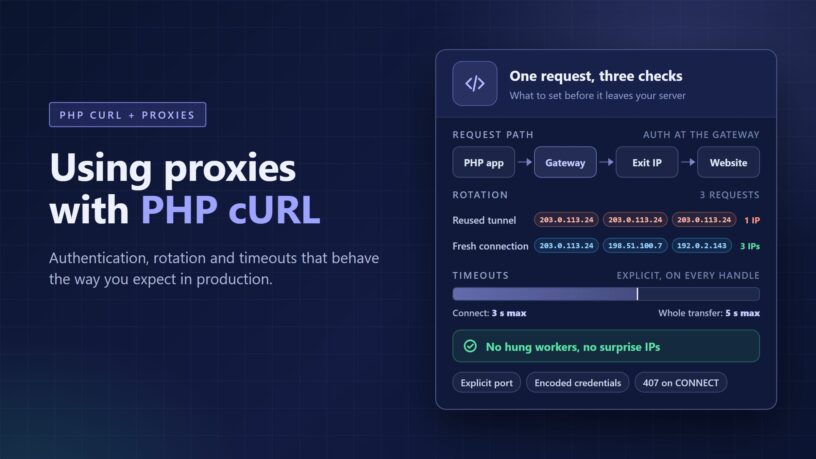
Most PHP code that talks to the outside world ends up on the cURL extension sooner or later. Guzzle, Symfony HttpClient and Laravel's HTTP client can all run on top of it when ext-curl is installed. So when a project needs a proxy, the same handful of cURL options do the real work, whatever library sits on top.
Pointing cURL at a proxy takes one option. Making it reliable takes a bit more thought. The bugs tend to cluster around three areas: authentication, IP rotation and timeouts. Each one fails in ways that look strange until you know what cURL is doing underneath.
This guide covers all three, using the option names from the PHP manual so you can look up any detail. It ends with where datacenter proxies fit and a short checklist for before you ship.
Telling cURL where the proxy is
The core option is CURLOPT_PROXY. It takes a host and a port, plus an optional scheme prefix that says what kind of proxy it is. Leave the scheme off and cURL assumes a plain HTTP proxy.
Leave the port off and libcurl falls back to 1080, a traditional SOCKS port. That catches people out when a provider hands over a hostname and the port gets forgotten along the way. Always write the port explicitly, even when it seems obvious.
The scheme prefix matters more than it looks:
- http:// is a standard HTTP proxy. For HTTPS targets, cURL asks the proxy to open a tunnel with a CONNECT request, then runs TLS through it.
- https:// works the same way, but the hop between your server and the proxy is encrypted too. Support arrived in cURL 7.52.0, so very old builds won't have it.
- socks5:// is a SOCKS5 proxy, with hostnames resolved on your own server.
- socks5h:// is SOCKS5 again, except the proxy resolves the hostname instead.
That last difference is easy to miss. With plain socks5://, the DNS lookup happens on your own machine. Some CDNs choose an edge server based on where that lookup came from. A request meant to look German can then land on infrastructure picked for your own data center. HTTP proxies avoid this, because the proxy receives the hostname and resolves it itself.
libcurl also reads proxy settings from environment variables such as http_proxy and all_proxy. That's handy on the command line and confusing everywhere else. PHP-FPM clears the worker environment by default through its clear_env setting. So a script can use a proxy when you run it by hand and skip it entirely under FPM.
Setting CURLOPT_PROXY explicitly overrides those variables, which keeps behaviour predictable. An empty string turns the proxy off even when a variable is set. Internal hosts that should never go through the proxy, such as your own APIs, belong in CURLOPT_NOPROXY.
Proxy authentication without the headaches
Commercial proxies usually authenticate in one of two ways: a username and password, or an allowlist of your server's IP addresses. Both work fine with cURL. They just fail in different ways.
Username and password
For credentials, CURLOPT_PROXYUSERPWD takes a single string in username:password form. There's a catch here that's easy to miss. Both parts are URL-decoded before use, so a colon inside the username has to be written as %3A. A literal percent sign in a password can be misread the same way.
The cleaner route is to set CURLOPT_PROXYUSERNAME and CURLOPT_PROXYPASSWORD separately. There's no colon to split on, so a username that contains one can't be misread. You can also embed credentials in the proxy URL itself, but then characters like @ and : need proper encoding.
CURLOPT_PROXYAUTH picks the authentication method and defaults to Basic, which many proxy gateways expect. If you allow several methods, cURL first asks the proxy which ones it supports. That negotiation can add an extra round trip. When you know the method, set just that one.
Basic authentication encodes credentials but doesn't encrypt them. Through a plain http:// proxy, the username and password cross the network in a form anyone on the path can read. That holds even when the target URL is HTTPS, because the CONNECT request goes out before the encrypted tunnel exists. An https:// proxy encrypts that first hop as well.
IP allowlisting
Allowlisting skips credentials entirely. The provider accepts traffic from the server addresses you register, and your code only names the proxy host. It's tidy right up until your outgoing address changes.
Autoscaling groups, container platforms and serverless functions often send traffic from addresses you don't control. A move to new infrastructure can quietly break every proxied request. The same goes for a developer testing from a laptop. If your egress IP isn't stable, username and password authentication is usually the safer choice.
Keeping credentials out of logs
Wherever the credentials come from, keep them in environment configuration or a secrets store, not in the repository. Then watch for the places they leak. Verbose output can expose sensitive header contents. Turn on CURLOPT_VERBOSE to debug, then turn it off again before the code ships.
Exception messages are the other common leak. If you build a proxy URL with credentials inside it, make sure error handlers never print it whole. Strip the password before anything reaches a log file or an error tracker.
Reading a 407
A 407 Proxy Authentication Required response means the proxy rejected your credentials. Where it shows up depends on the target. For a plain http:// URL, the 407 arrives as the normal response code.
For an https:// URL, the proxy rejects the CONNECT request before any tunnel exists. curl_exec() returns false, and the proxy's status is stored in CURLINFO_HTTP_CONNECTCODE rather than the usual response code. Check both values in your error handling. Either way, retrying a 407 is pointless until the credentials are fixed.
Rotation: a gateway or a list of IPs
Rotation comes in two shapes. With a rotating gateway, you connect to one host and port, and the provider swaps exit IPs behind it. With a proxy list, you hold a set of addresses and choose one per request in your own code.
Gateways move the hard work to the provider. You usually choose between a new IP on each request and a sticky session that keeps one IP for a while. How you select each mode varies by provider, so check their documentation rather than guessing.
Lists put the logic in your hands, and PHP's request model shapes how it works. Under PHP-FPM, each request starts with fresh memory. A round-robin counter kept in a static variable resets every time, so it keeps picking the first proxy.
Random selection needs no shared state and spreads load well enough for many jobs. For true round-robin or health tracking, keep the state in APCu or Redis. Count failures per proxy, bench one that keeps failing for a few minutes, then let it back in.
The connection reuse trap
This is the part that confuses people most. By default, a cURL handle keeps connections open after each transfer so the next one can reuse them. That's great for speed and awkward for rotation.
When the target is HTTPS, the CONNECT tunnel runs through one exit IP for as long as it stays open. Every request sent over that tunnel leaves from the same address. So a loop that reuses one handle can show a single IP for the whole batch, even with per-request rotation switched on.
If you want a fresh IP per request, give cURL a fresh connection. Set CURLOPT_FRESH_CONNECT to force a new connection, or CURLOPT_FORBID_REUSE to close each one after use. Each choice trades a little speed for the extra handshake.
Two PHP details make this trickier. Since PHP 8.0, curl_close() does nothing, and PHP 8.5 deprecates it. A handle and its open connections live until the last reference to it goes away. Calling it no longer guarantees the connection is gone.
Inside curl_multi, every handle you add uses a connection cache owned by the multi handle. A brand new easy handle can still pick up a tunnel left open by an earlier transfer. PHP 8.5 adds curl_share_init_persistent(), which can share connections between separate PHP requests. Both help speed, so decide on rotation first and tune reuse second.
Sticky sessions and when to use them
Per-request rotation suits a flat list of independent URLs. Sticky sessions suit sequences that should look like one visitor. Think of paging through public search results, or following a landing page to a product page to a local price.
A middle path works well for background workers. Give each worker a sticky session for a batch of requests, then rotate. You keep warm connections inside the batch and spread traffic across IPs between batches.
Keep in mind that libcurl won't reuse a connection that has sat idle longer than CURLOPT_MAXAGE_CONN, which defaults to 118 seconds. A long pause in a sticky sequence can quietly open a new tunnel. Whether that also means a new IP depends on how your provider handles sticky sessions.
Check which IP you actually got
It's tempting to read CURLINFO_PRIMARY_IP after a request and treat it as your exit IP. It reports the address cURL connected to, which with a proxy is the proxy itself. To see the exit IP, request an IP echo endpoint through the proxy and log the answer. Do that a few times in a row and you'll know whether rotation behaves the way you expect.
Timeouts that match how proxies fail
cURL's defaults are generous to a fault. The connection phase can take up to 300 seconds, and the total transfer has no limit at all. A proxy adds more places to stall: reaching the gateway, finding an exit, reaching the site and receiving a slow body.
CURLOPT_CONNECTTIMEOUT limits the connection phase, which covers DNS and every handshake until the connection is established. With a proxy in the path, that phase starts with reaching the proxy itself. A gateway that hasn't accepted your connection within a few seconds is rarely worth waiting for.
CURLOPT_TIMEOUT caps the whole transfer from start to finish, connect time included. Set the connect timeout to 3 and the total to 5, and no request lasts longer than 5 seconds. Millisecond versions of both exist. On builds that use the system's standard resolver, though, the DNS part still works in whole seconds.
There's a trap specific to curl_multi as well. If you cap connections on a multi handle, extra transfers wait in a queue. That waiting time counts against CURLOPT_TIMEOUT, so a tight total timeout can kill transfers that never really started.
For large downloads, a total timeout is a blunt tool. CURLOPT_LOW_SPEED_LIMIT and CURLOPT_LOW_SPEED_TIME work better as a pair. They abort a transfer that stays below a set number of bytes per second for a set number of seconds. A big but healthy file keeps going, while a stalled exit gets cut off.
PHP's own time limits won't save you
It's easy to assume max_execution_time will kill a hung request. On non-Windows systems, it doesn't count time spent in stream operations and system calls. A script blocked waiting on the network can run well past the default 30 seconds. Windows measures real time, so the same code can behave differently there.
Under PHP-FPM, request_terminate_timeout is the wall-clock backstop, but it's off by default and kills the whole worker. Treat it as a safety net only. The real fix is explicit cURL timeouts on every handle.
Picking starting values
There's no universal number, but a starting point helps. For ordinary pages through a fast proxy, try a few seconds to connect and 20 to 30 seconds in total. Then log real timings for a day and tighten from there. Datacenter routes tend to be quicker than residential ones, so they can often take tighter limits.
Errors, retries and telling the proxy from the site
When curl_exec() returns false, curl_errno() tells you why. A few codes come up again and again with proxies:
- CURLE_COULDNT_RESOLVE_PROXY (5): the proxy hostname didn't resolve, often because of a typo or a DNS issue on your server.
- CURLE_COULDNT_CONNECT (7): nothing accepted the connection, which often points to a wrong port or an outbound firewall rule.
- CURLE_OPERATION_TIMEDOUT (28): a timeout fired, and that includes the low-speed limit.
- A CONNECT code of 407: the proxy credentials are wrong or missing.
Ports cause their own confusion. Many proxies only allow tunnels to ports 80 and 443. A target on an unusual port can fail at the CONNECT stage even when everything else is right.
A retry policy that works well with proxies keeps the proxy's problems apart from the site's:
- Timeouts and connection errors: retry on a fresh connection, which on a rotating gateway usually means a new exit IP.
- A 407 from the proxy: stop and fix the credentials, since repeating the request changes nothing.
- A 429 from the site: slow down, honour any Retry-After header and back off with some random jitter.
- A 403 or a challenge page: one retry on a different IP is reasonable, but repeated refusals are the site's answer.
- A 5xx from the site: back off and retry a limited number of times.
Cap the total attempts and record the final failure instead of looping forever. Check the body as well as the status code. A page that returns 200 but shows an error message or a block notice still counts as a failure.
Where datacenter IPs fit
A datacenter proxy exits from an address owned by a hosting or cloud company, not a household broadband line. That makes it quick and, per gigabyte, usually the least expensive proxy type. The catch is that IP databases commonly label these ranges, so a site can often tell the request came from a server. Plenty of sites accept that, while others apply stricter rules to hosting traffic.
So datacenter IPs shine on public, lightly protected targets and on checks against your own properties:
- Localisation QA on your own sites, confirming redirects, currency and language for each country.
- Uptime and response-time monitoring from several countries at once.
- Link checking across large documentation sets or sitemaps.
- Public price and stock pages on sites that allow automated access.
- Integration tests for APIs that behave differently by country.
Everything covered above applies directly to a datacenter gateway. ProxyEmpire's datacenter IPs, for example, are served through one backconnect gateway with country-level targeting in 62 countries. You can take a new IP on every request or keep a sticky session, over HTTP or SOCKS5. That lines up with the two patterns from earlier: per-request rotation for flat URL lists and sticky sessions for sequences.
Whichever provider you try, test it with your real workload before committing to anything large. When comparing options, check how bandwidth is counted and whether you're charged only for successful requests.
A checklist before you ship
- Scheme and port are explicit in CURLOPT_PROXY, with socks5h:// when the proxy should resolve hostnames.
- Credentials come from configuration, are encoded correctly and never appear in logs or verbose output.
- Connect and total timeouts are set on every handle, plus a low-speed limit for large downloads.
- Connection reuse is a deliberate choice that matches your rotation mode.
- Errors are split into proxy problems and site problems, each with its own retry rule.
- Exit IPs are verified through an echo endpoint, not through CURLINFO_PRIMARY_IP.
Be a good guest on other people's servers
Proxies make it easy to send far more traffic than a small site expects. Read robots.txt and the site's terms before you start, and keep per-host concurrency low. Cache what you've already fetched, and use conditional requests where the server supports them.
Rotation spreads load across addresses. It doesn't give anyone permission to send more of it. If a site clearly doesn't want automated traffic, an official API or data feed is the better route.
Wrapping up
Most proxy bugs in PHP come down to a few defaults that nobody changed. A missing port, a 300-second connect timeout or a reused tunnel can each pass for a broken proxy. Set the scheme, port, credentials and timeouts explicitly. Then make connection reuse match the rotation you actually want, and confirm it with a real exit IP check.
